Projects
A project is an expense that goes beyond a single month: MoneyWr splits it into monthly instalments, builds them into the forecast and compares what was planned with what was actually spent.
Create a project in three steps
A name, a category, a low, medium or high priority, then the total amount and the period. The spread can be even, the same amount every month, or custom, month by month, with a check that makes sure the total adds up exactly.
The instalments go straight into the forecast: if a project makes a month critical, the home screen tells you before you have confirmed anything.
Track, adjust, close
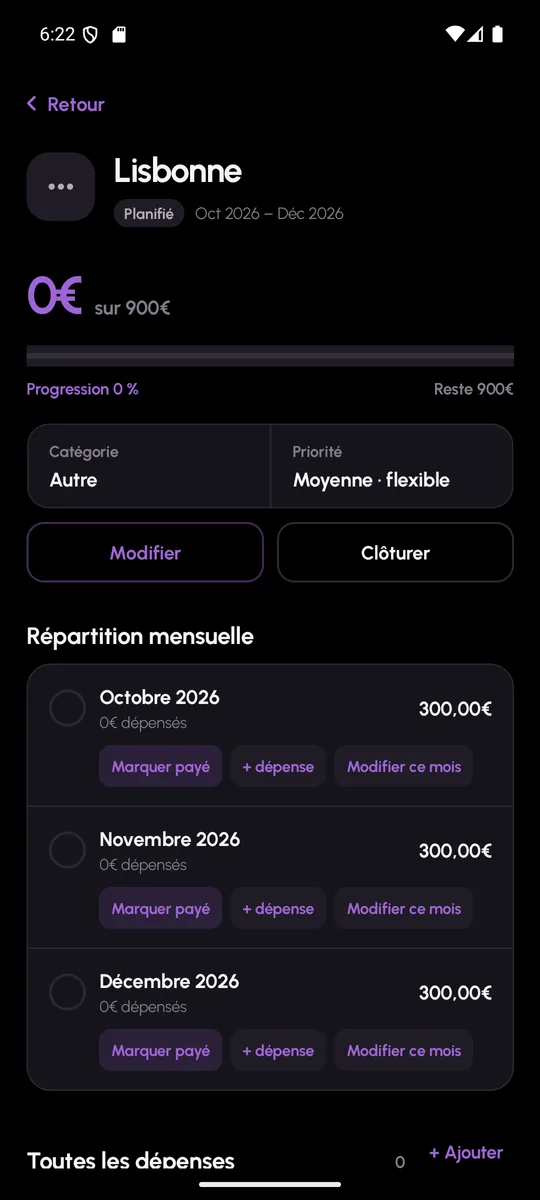
A project page shows every month of its period, the planned share, the amount spent and the gap. Actual spending is added as you go and ticked off as paid. An overspend is flagged in red.
A project can be edited while it is in progress: months already paid are protected, the others are redistributed. At the end, closing the project draws up the balance and frees the remaining months.
- Statuses: planned, in progress, completed and cancelled
- Filters by status and by category in the list
- Paid months protected when you edit
- Planned versus spent summary on closing
Projects: frequently asked questions
What is the difference between a project and a fixed cost?
A fixed cost comes back every month with no planned end. A project has a total amount and a period: MoneyWr spreads it, then tracks it until it is closed.
Can I change the spread once I have started?
Yes. Months already paid stay untouched, upcoming months are recalculated, and the app refuses to save until the total matches the amount of the project.