Monthly budget
The budget is the foundation of MoneyWr. You set it up once, and the app works out your expected end-of-month balance, month after month, and warns you when a month looks tight.
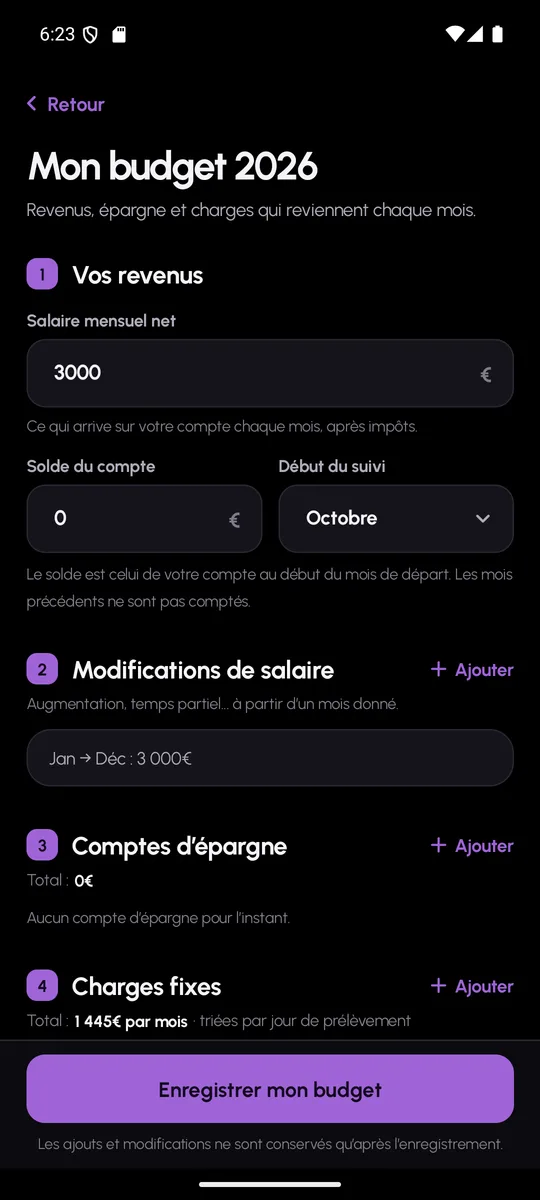
Three pieces of information are enough to start
Set-up takes three numbered steps: your monthly income, the current balance of your current account, then the list of your fixed costs. You also choose the starting month of the budget, so you do not have to re-enter a past you will not be tracking.
Each fixed cost has a name, an amount, a day of the month and a category. A subscription that starts in March or a loan that ends in September is declared with a start month and an end month: MoneyWr only counts it over the right period.
A twelve-month forecast
From this data, MoneyWr calculates for each month the opening balance, the planned costs, the project spending and the closing balance. The home screen sums up the year: current balance, expected end of month, and the net worth you can expect in December.
Months whose closing balance falls below zero are flagged as critical, right on the home screen and in the list of months. You see the problem before it happens, not on your bank statement.
- End-of-month balance calculated for each of the twelve months
- Critical months detected and shown on the home screen
- Net worth at year end: current account and savings
- Moving from one year to another from the bar at the top
No two months are alike
A bonus, a thirteenth-month salary, a month of short-time working: the income of a single month can be adjusted on its own, with a reason, and the adjustment can carry over to the following months. The forecast is recalculated immediately.
Fixed costs can be edited at any time from the same screen. A “pending changes” counter reminds you to save before you leave.
Monthly budget: frequently asked questions
Do I need to enter the whole history of the year?
No. You give a starting month and your account balance at that point. MoneyWr only projects forward from that month.
What happens if my income changes during the year?
Each month accepts an income adjustment with a reason. You can apply it to that month only, or to all the following months.
Can I manage several years?
Yes. The year selector at the top of the home screen lets you look back at a past year or prepare the next one, each with its own budget.